
This article was written by Claude Code (Fable 5.1) on 2026-09-27, from the code and documentation of the 31 ARGLabs repositories, and is published as it was written. Costs are estimates at us-east-1 list prices, not invoices.
1. Run a cloud company from git, and never open the console
ARGLabs is a fictitious company with a real AWS Organization, five accounts, a shared dual-stack network, a container platform, databases, a CDN and a cost-control layer. All of it comes from 31 Bitbucket repositories and is applied by pipelines. Nobody touches the AWS console. This document explains why the platform runs on ECS inside each team’s own account instead of a shared Kubernetes cluster, what the whole thing costs, and where it stands against AWS best practices.
| Figure | What it counts |
|---|---|
| 31 | repositories: 4 deployment roots, 4 applications, 20 Terraform modules, 3 tools |
| 5 | AWS accounts in 2 organizational units, plus the management account itself |
| 2 × 2 | regions and availability zones per environment (us-east-1, us-east-2) |
| 13 / 15 | minutes to destroy and to rebuild dev, stg and prd, measured on 2026-09-26 |
| 311 | automated tests: 245 Terraform test runs in 11 suites, 66 Python unit tests |
| 0 | stored AWS access keys, console changes, or NAT gateways |
The company in one paragraph
ARGLabs has two teams. The Cloud Team owns the organization, identity, the network, the Terraform modules and the tooling. The App Team builds and runs applications on top of that. The boundary between them is the whole design: the Cloud Team ships code and templates, and every team runs its own workloads in its own AWS accounts. The first (and so far only) team scope is called All In One, short name aio, with a dev, a stg and a prd account. The main region is N. Virginia (us-east-1), the second is Ohio (us-east-2), and the public domain is arglabs.org.
Highlights
- Account per environment, factory-made. A scope’s three accounts, their identity wiring, DNS, network share, IAM, ECS clusters, load balancers, audit trail, budget and cost dashboard come from one repository (
arglabs-bigbang-aio) that a new team copies and points at its own name. - One shared network, no NAT. A Cloud Team account owns every VPC and shares the subnets over AWS RAM. Three tiers, dual stack, a data tier with no route to the internet, and a DNS firewall. Outbound IPv6 is free through an egress-only gateway.
- ECS Fargate on Graviton and Spot behind one shared ALB per region, attached by the app’s own Terraform. No cluster to patch, no control plane to pay for.
- A workload template with ten switchable features (app, secrets, Aurora Serverless v2, Valkey Serverless, SQS, SNS, log bucket with Athena, data bucket, Lambda, CloudFront), each a single file that can be parked without breaking the others.
- Claude Code as the self-service portal. A
configureskill interviews the developer and edits the repository; anew-reposkill creates the next application from the template. - Lord of The Repositories turns whole environments on and off in dependency order with one button. It proved itself with two complete destroy-and-rebuild cycles in one afternoon, with zero failed pipelines.
- Cost is a first-class output. Every dashboard ends with the real cost of what it shows, every plan gets an Infracost comment, every account has a budget, an anomaly monitor and Cost Optimization Hub.
- Security scanning and OIDC on every pipeline. Checkov, Trivy and Gitleaks run on every change; pipelines borrow a role through OpenID Connect instead of holding keys.
2. Code first, AI second
The rule of the house is short: if it runs in AWS, it is in a repository, and a pipeline put it there. Dev takes no manual changes at all. Stg allows hands-on testing, but whatever is done by hand has to be written as code, proven in dev, and then stg is wiped and rebuilt from that code. Prd takes no manual changes. The console is for looking, and even that is rarely needed, because dashboards, Athena tables and a Resource Explorer view are created by the same code.
Why it pays
| Gain | Where it shows in ARGLabs |
|---|---|
| Environments become disposable | stg and prd infrastructure exists only while somebody needs it. lotr rebuilds all three environments in about fifteen minutes, so keeping them idle would be a waste, not a safety net. |
| Disaster recovery is a pipeline run | Rebuilding the company is the same button as building it. It was exercised twice on 2026-09-26, and the second cycle found nothing left behind. |
| Review and audit for free | Git says who changed what and why. The organization CloudTrail trail says who called which API, queryable with SQL. |
| Copies instead of projects | A new scope is a copy of the BigBang repository with three values changed. A new application is a copy of the workload template. Terraform derives every name from those values. |
| Drift is impossible to hide | Since nobody edits AWS by hand, any plan that wants to change something nobody committed is a signal, not noise. |
| Cost attaches itself to code | The provider tags every resource with app_name and env, both active as cost allocation tags across the organization, so the bill reads like the repositories. |
Where the AI sits
Claude Code is not bolted on at the end. The repositories are written so that a model can operate them safely, and that shapes the documentation as much as the code.
- Layered CLAUDE.md files. The workspace file holds the company facts (accounts, regions, state layout, naming rules, the three ways projects talk to each other, the environment policy). Each repository adds its own facts, gotchas and history. Claude reads them before touching anything, and the rules in them override its defaults.
- The manual is the input. Every feature file of the workload ends with a
DOCUMENTATIONblock: what it creates, what enabling or disabling it destroys, each option with its allowed values and default, what to check afterwards. Theconfigureskill reads the options from that block, so the assistant can never drift from the code it edits. - An assistant that interviews.
/configureworks in any language, asks multiple-choice questions whose first option is the current value, validates as it goes (12-digit account ids, real regions, Fargate CPU and memory pairs,min ≤ desired ≤ max), shows a table of every change, and edits nothing until the developer says yes. It composes scenarios too: a static site, services without an app, an API on Lambda with a database, a queue processed by a function, the app behind a CDN with a WAF. - An assistant that scaffolds.
new-repocreates the Bitbucket repository withmainas the default branch and, for an application, copies the currentmainofarglabs-workloadinto it. - Hard limits. The assistant never runs
plan,applyordestroy(only the pipeline can), never asks for secret values, does not commit inside the configure flow, and asks before running the 32-minute validation matrix. - Operations, not only editing. The 2026-09-26 destroy-and-rebuild exercise was driven by Claude over the Bitbucket API: it ran the stacks, inventoried the accounts, found orphaned log groups, fixed them in two modules, and wrote the report.
The result is a platform team without a portal. The portal is a conversation with a model that reads the same manual the engineers wrote, and every answer ends as a reviewed commit that a pipeline applies.
3. Design decisions
ECS in the team’s account. No EKS.
NOTE: For my (human behind ARGLabs) opinion about ECS/EKS, see ECS vs EKS
The loudest decision in ARGLabs is an absence. There is no Kubernetes anywhere. Applications run as ECS services on Fargate, in the AWS account of the team that owns them, attached to a load balancer that BigBang created for that team. ARGLabs takes a position on this: for a company that builds on AWS, the standard EKS setup is obsolete, technically and culturally.
Technically obsolete
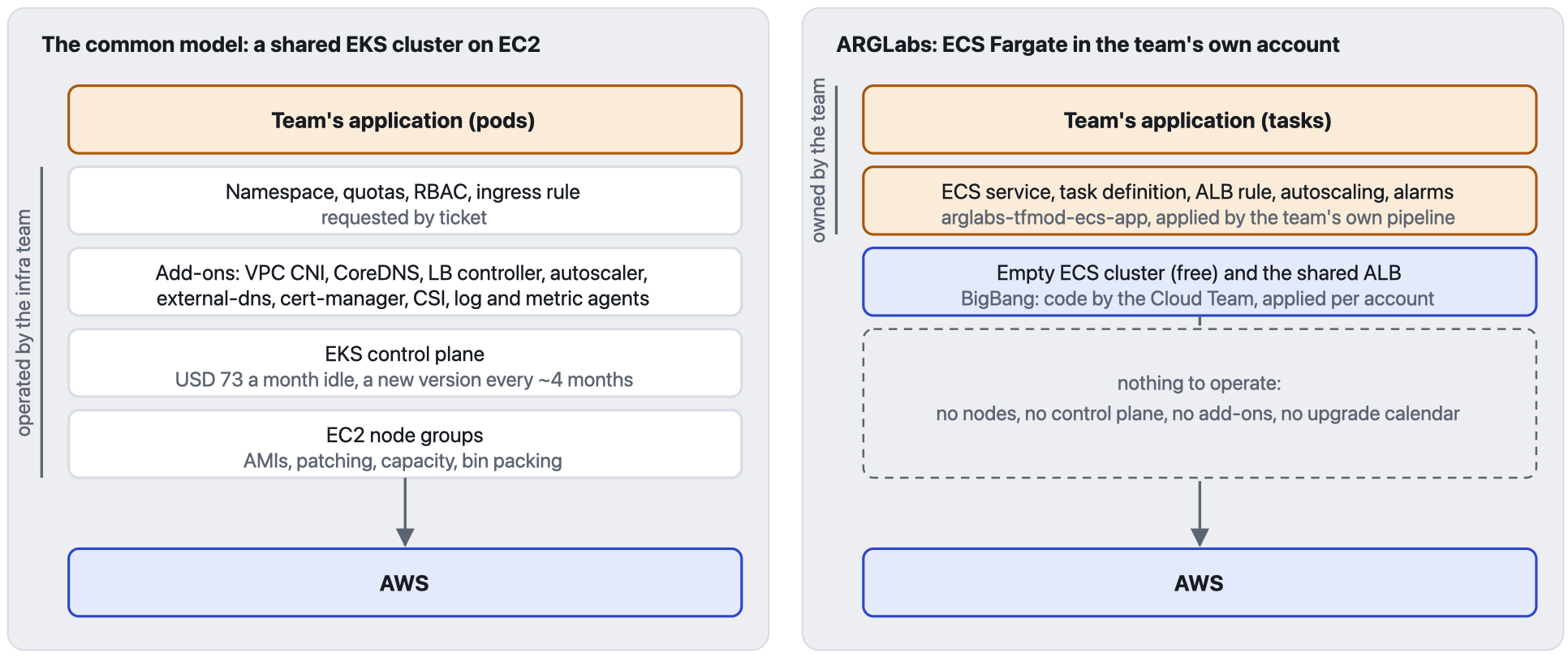
- The cluster is a product with a release calendar. Kubernetes ships a minor version roughly every four months and EKS supports each for about fourteen. Someone is always preparing the next upgrade, and a cluster that falls behind pays USD 0.60 an hour (USD 438 a month) in extended support instead of USD 0.10 (USD 73).
- The cluster needs a second platform on top to reach services AWS already has. The VPC CNI with its IP exhaustion problems, CoreDNS, kube-proxy, a load balancer controller, an autoscaler, external-dns, cert-manager, a secrets store CSI driver, logging and metrics agents. Each has its own version matrix and its own failure modes.
- Nodes bring servers back. AMIs, patching, capacity planning, bin packing, reserved instances, and a bad node that hurts every tenant on it.
- ECS is an AWS API, not a product to run. There is no version to upgrade, no control plane charge, and with Fargate no nodes. Task roles, target groups, CloudWatch, Secrets Manager and X-Ray are native, not plugins. In ARGLabs the cluster BigBang creates is an empty, free namespace; everything that matters arrives with the application from
arglabs-tfmod-ecs-app. - Cheaper compute by default. Tasks run on arm64 Graviton. dev and stg use 100% Fargate Spot; prd keeps two on-demand tasks per region and splits the rest evenly.
What native means in practice. ECS is an AWS service, so the rest of AWS already knows how to reach it. Behavior that is a project on EKS (install a controller, give it an IAM identity, keep it upgraded) is a few more resources in the team’s own Terraform on ECS. Two examples first, then Spot.
| You want | On ECS | On EKS |
|---|---|---|
| A task that runs only when a file lands in an S3 bucket | An EventBridge rule on the bucket’s Object Created event, with the ECS task as its target. EventBridge starts the task and passes the object key to the container as an environment override. The task ends when the file is processed. There is no service and no idle capacity. | EventBridge has no native target that starts a pod. The event goes through another service that reaches into the cluster (AWS Batch or Step Functions), or through something you install and run, such as a queue with a KEDA ScaledJob or Argo Events, plus an identity that lets it create the Job. |
| A queue worker that scales with the backlog and sits at zero when the queue is empty | Service Auto Scaling driven by the queue depth that SQS already publishes to CloudWatch, with a minimum capacity of zero. The service adds tasks as the queue builds up and removes them all when it drains. With no task running there is no Fargate compute to pay for. | The Horizontal Pod Autoscaler cannot read SQS by itself. KEDA, or another metrics adapter, is installed to feed it, given an IAM identity and kept upgraded, and when the last pod is gone a second autoscaler still has to remove the empty node. |
ARGLabs has no module for these two yet. Each is a handful of resources in the application’s own Terraform.
Spot is a setting of the service, not of the machine. Every ECS service carries its own capacity provider strategy: a base, the number of tasks that must run on-demand, and weights that split everything above the base between on-demand Fargate and Fargate Spot. A critical service can demand ten on-demand tasks and share the rest half and half with Spot. A queue worker can run on 100% Spot, and so can every service in a non-production environment. In ARGLabs these are two numbers per service, environment and region, set in the application’s own Terraform:
min_ondemand = { dev = { us-east-1 = 0, us-east-2 = 0 } stg = { us-east-1 = 0, us-east-2 = 0 } prd = { us-east-1 = 2, us-east-2 = 2 }}spot_weight = { dev = { us-east-1 = 100, us-east-2 = 100 } stg = { us-east-1 = 100, us-east-2 = 100 } prd = { us-east-1 = 50, us-east-2 = 50 }}
These are the values every ARGLabs application ships with. Making one service critical means raising its own min_ondemand in prd, and no other service notices.
On EKS the same knob does not exist. The hosts are EC2 instances, so Spot is decided where the instances are bought: a managed node group is Spot or on-demand, and a Karpenter NodePool allows Spot, on-demand or both. A pod can steer itself toward one kind of node with a node selector or affinity, and Karpenter’s documentation describes what it calls a crude method for a fixed ratio: labels on separate NodePools plus a topology spread constraint in every Deployment. What cannot be declared, per service, is “the first ten replicas on-demand, then half and half”. On EKS Fargate there is no Spot at all.
None of this is ECS being clever. These are features of AWS, and ECS gets them by being part of it.
Culturally obsolete
- The typical EKS is one big cluster on EC2, owned by an infrastructure team and shared by every product team. That is the VMware datacenter transplanted to the cloud: a central platform, capacity managed by one group, access through tickets, and a maintenance window that belongs to someone else.
- In that model a product team does not own where its software runs. It asks for namespaces, quotas, ingress rules, node sizes and upgrade windows. When something breaks, the first half hour goes to deciding whether the fault is the application or the cluster. The infrastructure team carries every team’s risk in one blast radius and learns to say no.
- DevOps does not survive contact with that structure. A team cannot own its service in production while another team owns the machines, the network plugin and the upgrade calendar underneath it. The old wall between development and operations is rebuilt inside the cluster, and “DevOps” becomes the name of the team that guards the gate.
- ECS in the team’s own account removes the shared runtime. The team owns the account, the pipeline, the service, the logs, the alarms, the budget and the bill. Nothing sits between the team and AWS. That is what makes the model in section 4 work, and it matters more than the price list.
What is given up, on purpose
- Portability through the Kubernetes API. The portable artifact is the container image, and ARGLabs keeps it portable: listen on port 8080, answer a health check, log JSON lines to stdout, stop on SIGTERM, run on arm64. That image runs on any orchestrator.
- The Helm catalog. Third-party software becomes a managed service (Aurora, ElastiCache, SQS, SNS, CloudFront) or a plain container, which is how the status page runs Gatus.
- DaemonSets, operators, custom schedulers. No workload here needs them. Sidecars live in the task definition.
A shared network with no NAT gateway
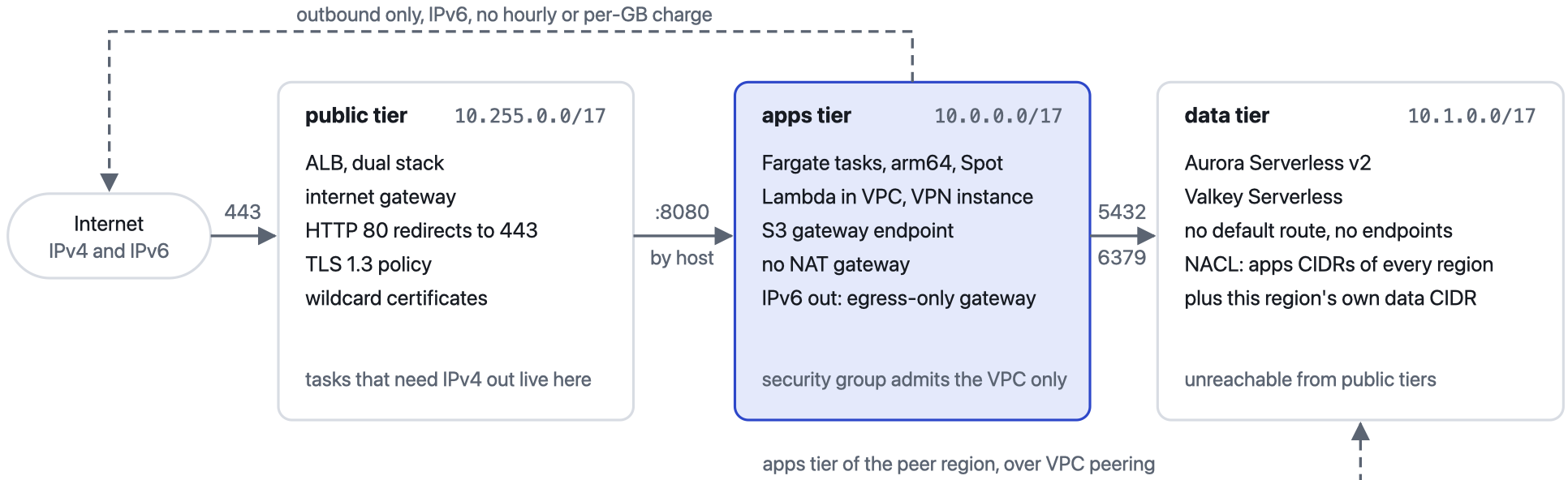
- The Cloud Team owns every VPC in a dedicated Shared Network account and hands the subnets to member accounts through AWS RAM. Team accounts cannot create networks: their
deployerrole has no VPC permissions beyond security groups. - Per environment, one VPC per region (us-east-1 and us-east-2, two availability zones each) with a full mesh of cross-region peering and routes to every peer CIDR.
- The data tier is isolated twice. Its route tables carry no default route and no endpoint route, and a network ACL admits only the apps blocks of every region plus its own data block. A public-tier address, even in the peer region, meets the default deny.
- Dual stack everywhere. AWS assigns a /56 per VPC and each subnet takes a /64. Apps subnets get outbound IPv6 through an egress-only internet gateway, which costs nothing.
- No NAT gateway, by arithmetic. Four NAT gateways (two regions, two zones) with their public addresses would cost about USD 146 a month per environment before any traffic. Tasks that need IPv4 out (to pull an image from ECR, or to probe external sites) are placed in the public tier with a public IP behind a security group that admits only the VPC. The status page and the example app do that today.
- AZ IDs, not AZ names. Subnets are created on
use1-az1, neverus-east-1a, because AWS maps names to physical zones differently per account and these subnets cross accounts. - DNS Firewall on every VPC with the AWS aggregate threat list, failing open, and a dashboard per scope. Flow logs, NAT and interface endpoints are each one boolean away in the module.
Decisions that shape every repository
| Decision | Reason |
|---|---|
| An AWS account per environment | The hardest boundary AWS offers, for blast radius, IAM and billing. Each environment has its own budget, trail, cost dashboard and DNS zone. |
| A minimal management account | Only the organization, Identity Center, the apex domain, organization-wide audit and the Terraform state. Nothing runs there. |
| Identity Center for people, OIDC for pipelines | Administrators are a group with AdministratorAccess; each scope’s team gets PowerUserAccess on its own accounts. Pipelines exchange a Bitbucket token for a role and hold no keys. |
| One workspace per environment, identical code | Values that differ live in maps keyed by environment: { dev = 1, stg = 2, prd = 3 }. A branch named dev-*, stg-* or prd-* becomes a throwaway workspace with its own names. |
Locals over variables, never .tfvars | Inputs arrive as TF_VAR_* from the scripts/vars*.sh files and are computed in locals, where Terraform can do arithmetic and string work. |
Modules from git at ref=main, newest providers | Every consumer picks up fixes on its next plan. Reproducibility is the price, discussed in section 7. |
Provider v6 per-resource region | One provider serves every region with no aliases. A new region is a new map key. |
| Names derived, never typed | <scope>-<app>-<what>-<region short>-<env>, environment always last. The region short code (use1, apse1) is derived from the region name by string manipulation and matches the AZ ID prefixes. |
| Serverless data services | Aurora Serverless v2 with auto pause in dev and stg, Valkey Serverless, Lambda, SQS and SNS. An idle environment costs little beyond its load balancers. |
| One file per resource group, outputs beside their resources | A group is disabled by renaming its file to .tf.no (or moving it to available-features/ in the workload), and its outputs disappear with it. |
Policies as jsonencode | No policy data sources or templates, so a policy reads as HCL next to the resource it protects. |
| A module never writes a policy it does not own | SNS exports the statements a queue needs; CloudFront exports the statements a bucket needs. The owner of the resource applies them. |
4. The DevOps model
Cloud Engineering and Cloud Platform do not run a platform. They write one, and hand it over as repositories.
The Cloud Team delivers
- A landing zone as code: the organization, identity, apex domain and audit (
arglabs-mainaccount-orgstuff), the shared network (arglabs-account-sharednetwork), and a BigBang per scope that creates the team’s accounts with everything inside them. - Twenty modules that encode the rules: roles under
/deployer/with a permissions boundary, encryption by default, TLS 1.3, private buckets, alarms, dashboards, cost widgets and tags. Compliance is the default output of the module, not a review step. - A ready repository:
arglabs-workload, with an example application, ten parkable features, the full pipeline, the scanners, Infracost, ephemeral environments and theconfigureskill. - Tooling:
arglabs-lotrto switch environments on and off, a shared pipeline library, a pre-commit hook.
The App Team owns
- Its repository, created by
new-repofrom the template. - Its code in
app/src/, in any language that honors the image contract. - Which features are on, and their settings per environment.
- Its variables and secrets, as
ENV_*andSECRET_*Bitbucket variables. - Its pipeline runs, environments, alarms, dashboards and monthly bill.
- Its incidents, with direct access to CloudWatch, X-Ray, Athena and AWS Support.
From zero to a deployed application
- Ask Claude Code for a repository.
new-repocreatesarglabs-<scope>-<app>on Bitbucket from the currentmainof the template. - Run
/configure, or describe what you need in your own words. It sets the accounts, scope, app name and regions, turns features on or parks them, tunes each option, and tells you what the next apply will create and destroy. - Drop the code into
app/src/, or let the tutorial write a first version in the language and framework you choose. - Push to
main. The pipeline creates the ECR repositories, builds arm64 images, deploys dev, then waits for one click before planning, scanning and pricing the change, and for another before prd. - To test in isolation, push a
dev-<name>branch and get a private copy of the whole stack with its own DNS names. Destroy it with a click, or let the reaper remove every copy at once.
Why the platform is serverless, and why that matters
The Cloud Team runs nothing on behalf of the teams. There is no cluster, no shared build farm, no shared ingress, no service catalog to keep alive. The platform is repositories plus AWS managed services, and it exists only when a pipeline applies it. Two consequences follow.
Every AWS capability is available on day one. Because the runtime is AWS itself, a team that needs a new service uses it directly in its own account. The Cloud Team’s job, at most, is to add a parameter to a module so that the teams’ Claude can offer it as a question. No platform layer has to learn to support a feature first, so the platform team never becomes the queue that new work waits in.
Troubleshooting goes to the source. When a service misbehaves, the team looks at its own logs, traces, metrics and costs in its own account. It can open a case with AWS Support itself. There is no cluster to blame, no shared ingress to inspect, and no ticket to another team between the symptom and the answer.
The old bargain was “we run the platform, you run your code”. The ARGLabs bargain is “we write the platform, you run everything”. It scales with the number of repositories, not with the number of people on call.
5. Architecture
Accounts and organizational units
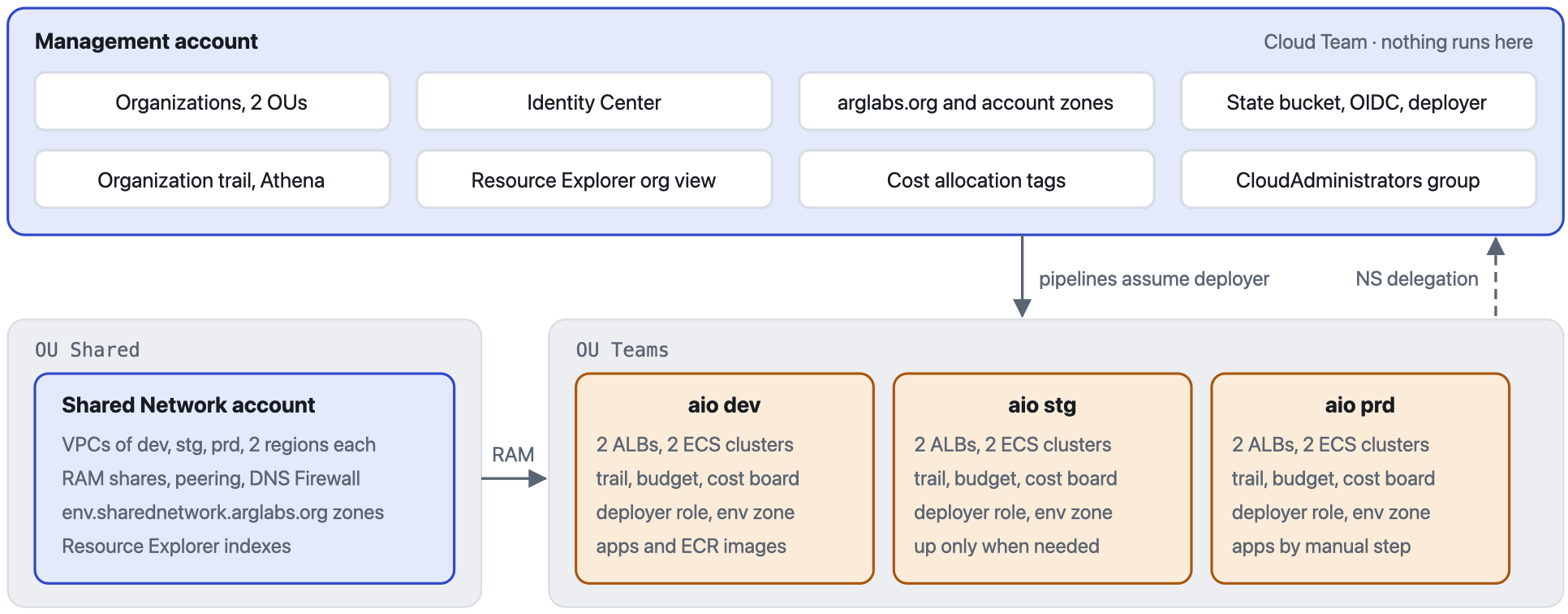
arglabs-bigbang-aio.Phases and dependencies
There is no shared Terraform root and no service discovery. Every dependency between projects is one of three mechanisms: a remote state read, an AWS resource shared at runtime, or a pipeline trigger. The remote state graph is the backbone.
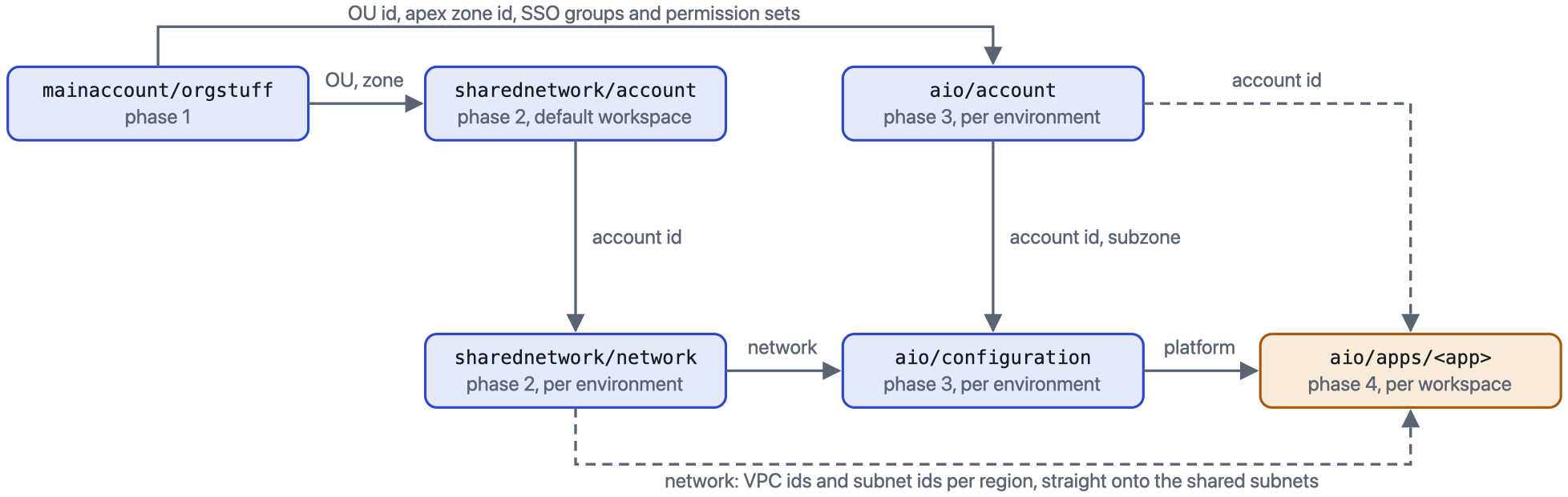
workspace = terraform.workspace, so dev only ever sees dev. Two outputs act as contracts: network and platform, both region-keyed maps.| Phase | Repository and root | Workspaces | State key | Destroyed by lotr? |
|---|---|---|---|---|
| 0 | arglabs-mainaccount-prereqs | none, by hand | local file | never |
| 1 | arglabs-mainaccount-orgstuff | default | mainaccount/orgstuff.tfstate | never |
| 2 | arglabs-account-sharednetwork, creation | default | sharednetwork/account.tfstate | never |
| 2 | arglabs-account-sharednetwork, configuration | dev, stg, prd | sharednetwork/network.tfstate | yes |
| 3 | arglabs-bigbang-aio, creation | dev, stg, prd | aio/account.tfstate | never |
| 3 | arglabs-bigbang-aio, configuration | dev, stg, prd | aio/configuration.tfstate | yes |
| 4 | each application, ECR root | dev only | aio/apps/<app>-ecr.tfstate | no (images survive) |
| 4 | each application, app root | dev, stg, prd, dev-* and friends | aio/apps/<app>.tfstate | yes |
Terraform will not accept a variable in a backend key, so every key is a literal. ARGLabs marks each such line with an anchor comment (###MARK_STATE_KEY, ###MARK_STATE_ACCOUNT, ###MARK_STATE_CONFIG) and scripts/change-data.sh rewrites those lines from info.sh. Every workspace except Terraform’s built-in default is stored under env:/<workspace>/, so one literal key serves dev, stg and prd.
DNS
The apex zone lives in the management account. Each account gets a subzone, delegated upward by a module that ships its own provider and assumes deployer in the management account. Each environment gets a further subzone in its own account. Applications write records only in the environment zone they own, and a regionless name spreads traffic across the regions that exist.
arglabs.org management account, registered domain├── aio.arglabs.org management account, created by bigbang-aio (dev workspace)│ ├── dev.aio.arglabs.org aio dev account, created by arglabs-tfmod-bigbang│ │ ├── external-alb-use1 A + AAAA alias to the shared ALB of us-east-1│ │ ├── external-alb-use2 the same for us-east-2│ │ ├── statuspage-use1 the status page in us-east-1│ │ ├── workload weighted, health-checked, spans every region of the app│ │ ├── workload-use1 the app in us-east-1│ │ ├── workload-db the Aurora writer, when tfmod-rds is on│ │ ├── workload-cache latency-routed to the region's Valkey cache│ │ └── workload-cdn the CloudFront distribution, when tfmod-cloudfront is on│ ├── stg.aio.arglabs.org aio stg account│ └── prd.aio.arglabs.org aio prd account└── sharednetwork.arglabs.org management account └── dev.sharednetwork.arglabs.org Shared Network account (and stg, prd)
Identity and trust
- A pipeline step marked
oidc: truereceives a short-lived token from Bitbucket. The management account trusts tokens from thearglabsworkspace only, by audience. - The step exchanges it for the
bitbucket-openidrole, whose only permission issts:AssumeRoleon any role nameddeployer. It also reads and writes the state bucket directly, which is why no backend setsassume_role. - The AWS provider assumes
deployerin the target account. In member accounts that role comes fromarglabs-tfmod-bigbang-iam: it trustsbitbucket-openidand the account’s SSO administrators, cannot create users or groups, cannot touch networks beyond security groups, and can only manage roles under the/deployer/path that carry thedeployer-boundary. It cannot rewriteOrganizationAccountAccessRoleor an SSO role to escalate. - Modules that must write in another account (the NS delegation, records in the apex zone, the RAM share acceptance) ship their own provider and assume a role there. Terraform forbids
countandfor_eachon such modules, so they have noenable_*switch.
The pipeline of an application

scripts/run-terraform.sh wrapper sits in every repository: it sources the vars*.sh files, logs in through OIDC, initializes the backend, selects or creates the workspace and runs the command.- Container settings come from Bitbucket variables by prefix.
ENV_LOG_LEVELbecomes the container variableLOG_LEVEL; a securedSECRET_API_KEYlands in Secrets Manager and is injected asAPI_KEY. The prefix is the allowlist, so the pipeline’s own tokens never reach a task. - Plans are artifacts. The JSON and text of each plan are published for Infracost, which then needs no AWS access. The binary plan is not, because it holds every variable in the clear.
- Accepted findings are annotated in place, with the rule id and the reason, never in a global ignore list, except the one Dockerfile finding Trivy cannot take inline.
- Custom pipelines cover
plan_all,destroy_all,registry,cleanup_parallel_deploymentsand the two lotr hooks.
6. What it costs
Estimates, not invoices: us-east-1 list prices, test-level traffic, and the resource counts from the 2026-09-26 rebuild. The real numbers live in each account’s cost dashboard and in the Infracost comment on every commit; this section explains where the money goes and where it deliberately does not.
Four ways to run ARGLabs
| Scenario | What it includes | USD / month |
|---|---|---|
| Everything off | organization, accounts, ECR images, AMI snapshots | 3 to 6 |
| Daily mode | dev network and platform, status page | 68 to 85 |
| Daily mode + example workload | app, secrets, log bucket in one region | 83 to 107 |
| Everything up | dev, stg, prd infrastructure; apps in dev | 180 to 220 |
Estimated USD per month.
Daily mode, line by line
| Component | What is billed | USD / month |
|---|---|---|
| Two ALBs, aio dev | 2 × 16.43 base, 4 × 3.65 public IPv4, a few LCU-hours | 47 to 50 |
| Account trail, aio dev | second copy of management events at USD 2 per 100,000, plus log group ingestion | 2 to 6 |
| Container Insights, enhanced, 2 clusters | custom metrics and performance log events | 2 to 5 |
| Dashboards | USD 3 each beyond three per account: the status page’s is the fourth in aio dev | 3 |
| Status page task | 0.25 vCPU, 0.5 GB, arm64 Spot; one public IPv4; 5-day logs | 6 to 8 |
| Hosted zones | arglabs.org, aio., sharednetwork., dev.aio., dev.sharednetwork. | 2.50 |
| Domain, trail storage, DNS Firewall, Cost Explorer calls | renewal spread over the year, S3, USD 0.60 per million queries, USD 0.01 per widget request | 3 to 8 |
| Total | 68 to 85 |
What the design refuses to pay
Money that never reaches the bill
| Scenario | What it includes | USD / month |
|---|---|---|
| No NAT gateways | 2 regions × 2 zones × 3 environments, with their IPv4 | 438 |
| No EKS control planes | one cluster per environment, before any node | 219 |
| stg and prd switched off | two environments of platform and network, via lotr | 112 to 134 |
Estimated USD per month, before any traffic.
Add the services ARGLabs uses that cost nothing: Organizations, Identity Center, Resource Explorer, Budgets, Cost Anomaly Detection, Cost Optimization Hub, ACM certificates, the organization trail’s first copy of management events, egress-only internet gateways, S3 gateway endpoints and intra-region peering.
Reading the numbers
- The load balancers are the floor. Two ALBs with their four public addresses are about 60% of daily mode. A single-region dev, with us-east-2 reserved for region tests, would save about USD 25 a month.
- The budget sits under the floor. A USD 50 budget per environment against an estimated USD 55 to 65 means the actual-spend alert will likely fire every month in dev. Raise the budget, or lower the floor.
- Dashboards add up quietly. Every module ships one. In an account with many features on, dashboards can cost more than the compute.
- Public IPv4 is a tax on every entry point: four per environment on the ALBs, one per task in a public subnet, USD 3.65 each.
Prices assumed
| Item | us-east-1 list price used |
|---|---|
| Application Load Balancer | USD 0.0225 per hour (16.43 per month) plus 0.008 per LCU-hour |
| Public IPv4 address | USD 0.005 per hour (3.65 per month) |
| Fargate, Linux, arm64 | USD 0.03238 per vCPU-hour and 0.00356 per GB-hour; Spot about 70% lower |
| NAT gateway | USD 0.045 per hour per gateway or per zone of a regional gateway, plus 0.045 per GB |
| EKS | USD 0.10 per cluster-hour; 0.60 under extended support |
| Route 53 | USD 0.50 per hosted zone; health checks from 0.50 |
| CloudWatch | USD 3 per dashboard beyond three per account, 0.10 per alarm, 0.30 per custom metric, 0.50 per GB ingested |
| CloudTrail | first copy of management events free; USD 2 per 100,000 events for a second copy |
| Secrets Manager | USD 0.40 per secret, replicas included |
| Cost Explorer API | USD 0.01 per request |
| DNS Firewall | USD 0.60 per million queries |
| EC2 and EBS | t4g.micro USD 0.0084 per hour, t4g.small 0.0168; gp3 0.08 per GB-month |
| Aurora Serverless v2 | USD 0.12 per ACU-hour; storage 0.10 per GB-month |
| Valkey Serverless | about USD 6 per month at the minimum storage |
7. Assessment
Verdict: a well-architected estate, operated with more discipline than most companies manage at any size. Operations and cost are ahead of common practice. The gaps cluster in two places: preventive controls at the organization level, and the protection of the Terraform state. Both are cheap to close and none of them undermines the design.
Where it matches AWS guidance
- Multi-account with OUs and a management account that runs nothing
- Identity Center with groups and permission sets; no IAM users in daily use
- OIDC federation for CI; no stored access keys
- A least-privilege deployer with a permissions boundary and a role path
- Centralized network with RAM sharing
- Three subnet tiers, a data tier with no internet path, NACLs as a second layer
- Dual stack with IPv6 egress
- DNS Firewall with AWS managed threat lists
- An organization CloudTrail trail with log file validation, queryable
- Encryption by default for EBS; SSE for every bucket; TLS 1.3 at the edge
- Secrets in Secrets Manager, injected at start, never in code or state
- Image scanning on push; IaC and dependency scanning in CI
- Tagging strategy with active cost allocation tags
- Budgets, Cost Anomaly Detection, Cost Optimization Hub, Compute Optimizer
- Graviton and Spot; serverless data services that scale to zero
- Multi-AZ and multi-region with health-checked failover
- Everything as code, in version control, applied by pipelines with manual gates for production
- Rehearsed recovery: full destroy and rebuild in minutes
By pillar
| Pillar | Rating | Strengths | Gaps |
|---|---|---|---|
| Operational excellence | Strong | One pipeline shape everywhere; documentation written for people and for the AI; 311 automated tests across the modules; a rehearsed rebuild; a CHANGELOG in every repository; a hook that formats and documents on commit. | Floating module refs and no lock files; stale states and paused pipelines pile up. |
| Security | Good | OIDC, Identity Center, a boundary-constrained deployer, organization trail, DNS Firewall, isolated data tier, TLS 1.3, encryption by default, scanning, write-only secrets, monitoring of secret reads. | No SCPs, GuardDuty, Security Hub or Access Analyzer; Config off; a wide management deployer; audit logs in the management account; secrets in plan artifacts. |
| Reliability | Good | Two zones and two regions; weighted, health-checked names; Aurora global database option; autoscaling with an emergency policy; a fifteen-minute rebuild. | State bucket without versioning or locking; no AWS Backup plans; status page history lost on deploy. |
| Performance efficiency | Good | Graviton everywhere, serverless data stores, least-outstanding-requests routing, latency-routed cache names, CloudFront on demand. | Nothing significant at this scale. |
| Cost optimization | Strong | Tags, budgets, anomaly detection, Cost Optimization Hub, a cost widget on every dashboard, Infracost on every plan, no NAT, Spot, auto pause, lotr. | The budget sits below the fixed floor; two ALBs in every environment. |
| Sustainability | Strong | Graviton, Spot, idle environments switched off, services that scale to zero. | Nothing significant. |
Gaps, most important first
[High] The Terraform state is unprotected
The state bucket has versioning disabled and no backend uses use_lockfile or a lock table. A bad write or two overlapping runs can corrupt a state with nothing to roll back to.
Do: enable versioning with a lifecycle on old versions; add use_lockfile = true to every backend block.
[High] No preventive controls above the accounts
There are no service control policies, and GuardDuty, Security Hub, Access Analyzer and AWS Config are all absent or off. Safety depends on every IAM policy being right.
Do: a small SCP set (no leaving the organization, no stopping CloudTrail, no root user, only the two regions), GuardDuty and Security Hub with delegated administration, Access Analyzer at the organization level. A few dollars a month at this size.
[Medium] The management account carries too much
Its deployer holds iam:*, organizations:*, s3:* and sso:*; the bootstrap IAM user still exists; its state sits on a laptop; and the organization trail’s bucket lives in the management account, where AWS recommends a separate log archive account.
Do: deactivate the bootstrap keys between uses, move the bootstrap state into the bucket, narrow the wide permissions to what is managed, and create a log archive account with the BigBang pattern.
[Medium] Modules and providers float
Every consumer fetches modules at ref=main and the newest providers, prd included. A push to a module changes the next plan everywhere. Chosen for speed.
Do: keep main for dev and ephemeral stacks, pin tags for prd with scripts/change-tfmod-ref.sh, and commit lock files.
[Medium] Plan artifacts carry secrets
The published plan JSON includes every root variable, sensitive ones included, so SECRET_* values are readable by anyone who can download artifacts. Documented and accepted today.
Do: strip the variables block before publishing, or stop passing secrets as TF_VAR_*.
[Medium] Tasks run with public IPs
The cost of having no NAT: tasks that need IPv4 out sit in the public tier with a public address. Security groups admit only the VPC, so exposure is small, but each address is USD 3.65 a month and one more thing to reason about.
Do: as the task count grows, compare with ECR, Logs and Secrets Manager interface endpoints (private subnets, still no NAT), or with IPv6-only tasks.
[Low] lotr has blind spots
A repository absent from repos.yml can leave a security group in a shared VPC and block the network destroy (newapp and the VPN today), and two runs cannot overlap because Bitbucket serializes the production deployment.
Do: list every application repository, and add a pre-destroy check for foreign network interfaces and security groups in the shared VPCs.
[Low] Budget below the floor
USD 50 per environment against an estimated USD 55 to 65 with two ALBs.
Do: raise it, or run dev in one region.
[Low] No network or DNS query logs
Blocked DNS queries exist only as metrics and there is no record of flows. Fine for a lab.
Do: turn both on for prd with short retention.
[Low] Unpinned images and untested paths
The python:alpine and uv base images are unpinned, builds push latest, stg and prd applications have never been deployed end to end, and ephemeral workspaces reference an image name the build does not push (a known bug).
Do: pin base images by digest, and run one full stg deploy through lotr as a release rehearsal.
8. Practices born here
Some of what ARGLabs does is textbook AWS. The ideas below were built here, for problems the textbook does not cover.
Lord of The Repositories
Non-production environments cost money every hour, and a shutdown schedule owned by a platform team never fits every team’s hours. lotr hands the switch to the team. Its repos.yml declares repositories and stacks: ordered lists of repo:<name>:<pipeline> or stack:<name> entries. The order written is the order run, so an apply stack lists foundations first and a destroy stack lists them last, by hand, with no automatic reversal to get wrong. Each trigger is polled to completion before the next starts. on_failure: stop halts the run and marks the rest as skipped; OVERRIDE_ON_FAILURE bends it for one run. The whole file is resolved and validated before anything is triggered: unknown names, missing pipelines, bad keys and cycles all fail first. plan prints the exact order without touching a pipeline.
stacks: infrastructure-apply-all: - repo:sharednetwork:lotr_apply_all - repo:bigbang-aio:lotr_apply_all applications-apply-dev: - repo:workload:lotr_apply_dev - repo:statuspage:lotr_apply_dev all-destroy-all: - stack:applications-destroy-all - stack:infrastructure-destroy-all
The evidence. On 2026-09-26 lotr ran two full cycles over dev, stg and prd. all-destroy-all took 13 min 45 s and 12 min 28 s. The rebuild took about 15 minutes each time: the organization in 1 min 16 s, the infrastructure in 8 to 9.5 minutes (163 network and 105 platform resources per environment), the applications in about 5. No pipeline failed. The exercise also found log groups that AWS creates on its own and that every previous destroy had left behind; they are now created by Terraform first, so a destroy is clean.
BigBang, the copyable account factory
Accounts, identity, DNS, network share, IAM, clusters, load balancers, audit and FinOps for a whole scope come from one repository and one module call. A new team changes three values and pushes.
Parkable features with a proof
Each workload feature is one file that never references another. Moving it to available-features/ switches it off, and validate-matrix.sh proves all 1,024 combinations still validate, so a toggle is always reversible.
Anchors where Terraform forbids variables
Backend and remote state keys must be literals. Lines that depend on the scope carry a ###MARK_* comment, and change-data.sh rewrites exactly those from info.sh, idempotently, aborting if an anchor is missing.
Contracts between layers
network from the shared network and platform from each scope are region-keyed aggregates. Consumers resolve the region once and read plain fields, so a layer can change inside without breaking readers.
A full stack per branch, and a reaper
A branch named dev-<anything> deploys a separate copy of the stack with its own names and DNS. cleanup_parallel_deployments destroys every workspace matching <env>?* and never the real one.
Documentation the assistant executes
The DOCUMENTATION block at the end of each feature file is both the manual and the input of the configure skill. With new-repo, it replaces a self-service portal with a conversation that ends in a reviewed commit.
Cost where the eyes already are
Every dashboard that shows a service ends with that service’s real cost from Cost Explorer, filtered by its tags. All the widget code lives in one module, so every cost figure in ARGLabs is computed the same way.
Who read the secret
No AWS metric reaches a single secret, so metric filters on the account trail count reads per role, failed reads (with an alarm) and changes, shown per region.
Prefixes as the allowlist
Only ENV_* and SECRET_* Bitbucket variables reach a container. A blanket copy of the environment would have shipped the pipeline’s own tokens into production.
An example app that breaks on request
?status=503, ?delay=, ?cpuburn= and ?memburn= let anyone watch the ALB replace a task, Route 53 drop a region, or autoscaling add tasks at 70%.
Region migration in three deploys
Add the new region, set the old region’s weight to zero on the regionless name, remove the old region. Clients follow the regionless name and never notice.
Clean destroys by ownership
Anything AWS would create by itself is created by Terraform first so a destroy removes it; anything that must outlive an environment (Resource Explorer indexes, the accounts) lives in a root that is never destroyed.
Skip what did not change
The ECR root applies only when a fingerprint of its code and inputs changes, which spares a full Terraform run on almost every push.
Modules that never write a policy they do not own
SNS exports what a queue must allow; CloudFront exports what a bucket must allow. The resource owner applies the statement, so no module reaches into another’s policy.
9. Roadmap
In the order that buys the most safety for the least work.
- Version the state bucket and lock every backend.
- Add baseline SCPs, GuardDuty, Security Hub and Access Analyzer; turn the Config module on in prd.
- Create a log archive account through BigBang and move the organization trail’s bucket there.
- Pin module tags and commit lock files for prd; keep
mainfor dev. - Register every application repository in
repos.yml, with a pre-destroy check for foreign resources in the shared VPCs. - Align the budget with the floor, or run dev in one region.
- Move the application pipelines onto
arglabs-cloudteam-sharedpipelines, so a pipeline fix lands everywhere in one commit.
Sources: the 31 repositories on main as of 2026-09-27 (READMEs, CLAUDE.md files, pipelines, scripts and Terraform code) and the lotr destroy-and-rebuild report of 2026-09-26. Costs are estimates at us-east-1 list prices, not invoices.


You must be logged in to post a comment.